Help My Truck
ALIAKRAFT SOLUTIONS LLCAuto & Vehicles
2.811.00 Reviews
- Version
- 1.1.19
- Installs
- 10.00K
- Age Rating
- Everyone
Screenshots
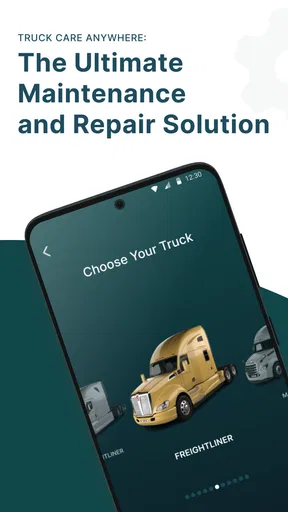
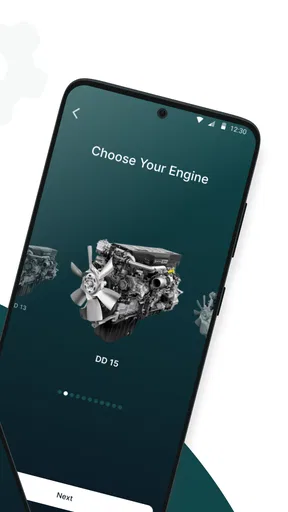
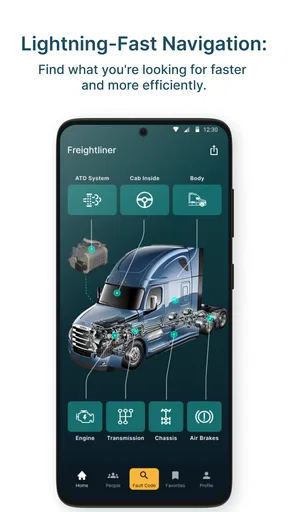
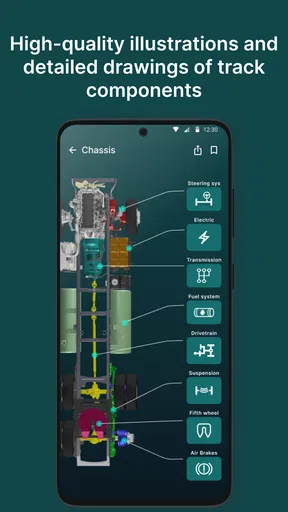
Our Review of Help My Truck
 Analysis by Appyee
For me, the most useful idea behind Help My Truck is that truck driving decisions are connected: a route affects where you can safely travel, when you can stop for fuel, and how much a delay can disrupt the day. An app aimed at truckers can make those choices easier to manage than a general map alone. I’d treat it as a practical aid for planning and checking a journey, not as a substitute for attention, road signs, or a driver’s own judgment.
Why truck-focused planning matters
A car-navigation app can be perfectly good at finding a quick route and still miss the details that matter to someone driving a truck. Low clearances, tight turns, and roads unsuitable for a larger vehicle can turn an apparently simple shortcut into a serious problem. That is the difference I look for in a truck-oriented tool: not just a line on a map, but help thinking about whether the route makes sense for the vehicle.
That distinction is most important before departure, when there is time to review the plan rather than react to a confusing turn. I would still check the route against current signs and any restrictions relevant to my vehicle. Navigation can support a decision, but it should not overrule local road information or common sense, particularly when conditions change.
A useful role alongside your usual tools
I would not automatically replace a familiar navigation app with a new one. Instead, I’d compare the route before setting off and use the truck-focused option when its guidance better fits the vehicle. Keeping a second map available can also be useful if a signal drops or a planned road becomes unsuitable. The trade-off is that switching between tools takes attention, so I’d make those checks while parked rather than while driving.
For fuel planning, the practical question is not only which stop looks cheapest, but whether it works with the day’s route and timing. A lower listed price is less helpful if reaching it means a detour that costs time or complicates the drive. I’d use price information as one input, then weigh it against convenience and the route I actually need to follow.
Who is likely to get the most from it
This kind of app makes the most sense for drivers who regularly handle long trips and want route, fuel, weather, and driver-to-driver information in one place. It may also be useful to someone newer to trucking who wants extra context while building confidence in planning. On the other hand, a driver who already relies on a dedicated navigation setup and only needs occasional directions may see less value in adding another app.
I’d also be cautious about treating community posts or changing road information as definitive. They can provide useful context, but they are not a replacement for official instructions or a verified route check. That balance—using shared information as a helpful prompt rather than a guarantee—is important in a job where a bad turn can have consequences beyond a few wasted minutes.
What to check before relying on it
Before a long trip, I’d enter the destination while parked, review the proposed route, and make sure the phone is mounted and powered safely. If the plan depends on fuel stops or weather conditions, I’d check those early enough to make a sensible adjustment. A quick preparation routine is more useful than trying to explore menus once the truck is moving.
It is also worth thinking about how much battery and mobile data a navigation session may use. Continuous GPS and data can be demanding, so a charger is sensible for longer drives. If you are weighing the free app against paid options, consider whether you will use the extra functions often enough to justify an in-app purchase; the available purchase range is $4.99 to $84.99 per item. I would first decide what problem I need solved rather than paying for features simply because they are offered.
Are you a truck driver looking for a handy app to manage your journeys more efficiently? Well, I recently got my hands on Help My Truck, and let me tell you, it’s packed with features that might just make your life on the road a whole lot easier. So, buckle up, and let's dive into what this app has to offer.
Features That Keep You Rolling
Help My Truck is like having a co-driver in your pocket. It offers a range of features that are designed to cater to the unique needs of truck drivers. First off, the navigation system is pretty spot-on. It’s tailored for trucks, considering all those low bridges and narrow roads you definitely want to avoid. The app uses real-time traffic updates to help you steer clear of jams, saving you time and fuel.
But that’s not all. One thing I really appreciated was the fuel price tracker. It shows you the cheapest fuel prices along your route. Given how gas prices can be a real pain, this feature is a game-changer for keeping your costs down.
Stay Connected with Other Drivers
Loneliness can be a real issue when you're out on those long hauls. Well, the app has a community feature that lets you connect with other truckers. You can share tips, route information, or just chat to pass the time. I found that aspect really refreshing and a great way to get some insider knowledge about the roads ahead.
Besides, there’s also a built-in weather alert system. Knowing the weather conditions up ahead can be crucial for planning your journey. I found it super helpful, especially when navigating through areas prone to sudden weather changes.
Easy-To-Use Interface
Now, let’s talk about the design. The interface is clean and intuitive. Even if you’re not tech-savvy, you’ll find it easy to navigate through the app. Everything is laid out logically, and the maps are clear and detailed. You won’t find yourself fumbling through menus while driving, which is definitely a plus.
Setup was straightforward, too. It doesn’t bombard you with unnecessary permissions, which is a relief. I felt comfortable knowing that my data wasn't being exploited.
Some Things to Consider
Of course, no app is without its quirks. While Help My Truck does a great job overall, I did notice that the battery consumption can be a tad high if you’re using it continuously with GPS and data. Make sure you have a charger handy!
Another point is that while most features are free, there are some premium options available. If you’re looking for extras like advanced route planning or more detailed fuel analytics, you might need to consider a subscription. It’s not a deal-breaker, but something to keep in mind.
How I would fit it into a working day
Picture a morning departure followed by a long delivery run, with a fuel stop and changing weather along the way. I’d use the app before leaving to review the truck-friendly route, note a practical fuel option, and check the weather ahead. Once underway, I’d keep the phone mounted and use spoken guidance where available, rather than handling the screen. At a planned stop, I could check for traffic changes or useful notes from other drivers before continuing.
The value in that routine is preparation, not constant interaction. A community tip can prompt me to investigate a possible issue, but I would not make a sudden detour based on an unverified post. Likewise, a fuel-price comparison is useful only when the stop fits the route and schedule. Those checks are most helpful when they happen safely while parked.
How it compares with familiar alternatives
For many drivers, the usual alternatives are a general navigation app, a dedicated truck navigation device, and separate tools for fuel or weather. A general map can be convenient for ordinary directions, but truck-specific routing is the reason to consider this app. A dedicated device may suit someone who wants a separate screen and a purpose-built setup, while separate apps can be preferable if the driver already trusts particular services for individual tasks.
The all-in-one approach is convenient, but it also means the app has to earn a place in an existing routine. I would compare its proposed routes with the navigation I already trust on a few familiar journeys before leaning on it for an unfamiliar one. If the truck-oriented guidance consistently helps me assess roads, it has a clear role; if I need a more specialized setup or guaranteed offline navigation, I would choose a tool that explicitly meets that need.
Availability, cost, and expectations
ALIAKRAFT SOLUTIONS LLC develops this free Auto & Vehicles app. It is rated for Everyone, has an average rating of 2.9 from 33 ratings, and has passed 10K+ installs. Those figures suggest that people have tried it, but the modest average is a reason to test the parts that matter to you instead of assuming every feature will fit your workflow. It was released on July 24, 2024, and the current version is 1.1.17.
The minimum operating-system requirement is Android 8.0. Before making it part of a work routine, I’d check that the phone can run it comfortably and that the screen is readable in the vehicle mount. The app costs nothing to install, but in-app purchases range from $4.99 to $84.99 per item. I’d start with the free experience and only consider paying after identifying a specific feature I genuinely need.
Where I would draw the line
This is not the right choice for someone expecting an app to make every routing decision automatically or to guarantee that a road is suitable in every circumstance. Vehicle dimensions, local restrictions, temporary closures, and changing conditions all matter. I would verify critical details independently and follow official signs, even when a digital route suggests otherwise.
It may also be unnecessary if you drive only occasionally, already have a dependable truck-navigation system, or prefer to keep work tools separate. And if you do not want a navigation app using GPS and mobile data for extended periods, the battery trade-off deserves consideration. A charging setup and a brief trial on a familiar route can help you decide whether the convenience is worth it for your situation.
Final Thoughts
Overall, Help My Truck is a solid app for any trucker. It’s designed with your needs in mind, from navigation to fuel savings, and even social connectivity. It’s like having a digital co-pilot that helps make those long hauls a bit more manageable and a lot more efficient.
Whether you’re a seasoned road warrior or new to the trucking game, this app is definitely worth a download. Just make sure you have a charger close by, and you’re all set for the road ahead!
Verdict
Strengths of Help My Truck
- User-friendly interface for easy navigation.
- Real-time GPS tracking for accurate location.
- Comprehensive service directory available.,24/7 customer support for emergencies.
- Regular updates with new features.
Limitations of Help My Truck
- Limited availability in remote areas.
- Requires constant internet connection.
- Subscription needed for premium features.
- Occasional glitches in older devices.
- Notifications can be overwhelming.
Similar Picks in This Category
View All
Android Auto
Google LLC4.1

maxim — order a taxi & food
PT. SITO4.7

Штрафы ГИБДД: проверка с фото
Pays LLC – Штрафы ГИБДД4.7

Номерограм – проверка авто
Авто Ассист4.8

Дром Авто
Дром4.9

Frequently Asked Questions
What is Help My Truck and how does it work?
Help My Truck is a mobile app designed to assist truck drivers with real-time support and resources. The app provides features like route optimization, traffic updates, and emergency assistance. It connects drivers with nearby services such as repair shops and fuel stations, ensuring they have the support needed for efficient and safe journeys.
Is Help My Truck available for both Android and iOS devices?
Yes, Help My Truck is available for download on both Android and iOS platforms. Users can find the app on the Google Play Store for Android devices and the Apple App Store for iOS devices, ensuring broad accessibility for truck drivers regardless of their smartphone preference.
What are the main features of Help My Truck?
Help My Truck offers a range of features tailored for truck drivers, including GPS navigation with truck-specific routes, real-time traffic and weather updates, roadside assistance, and a directory of truck stops and services. These features aim to enhance safety and efficiency on the road, providing comprehensive support for drivers.
Does Help My Truck require a subscription or is it free to use?
Help My Truck offers a basic version that is free to use, providing essential features like navigation and traffic updates. However, for access to premium features such as roadside assistance and advanced route planning, a subscription may be required. This allows users to choose the level of service that best fits their needs.
How reliable is the information provided by Help My Truck?
The app sources its data from trusted providers and frequently updates its information to ensure reliability. Traffic and weather updates are delivered in real-time, and the directory of services is regularly maintained. User feedback also contributes to improving the accuracy and usefulness of the information provided.
